How to Choose the Right Wattage Power Supply for Your Build
Undersizing a PSU risks instability; wildly oversizing wastes money. Here is a practical way to land on the right wattage for your gaming PC.
Undersizing a PSU risks instability; wildly oversizing wastes money. Here is a practical way to land on the right wattage for your gaming PC.
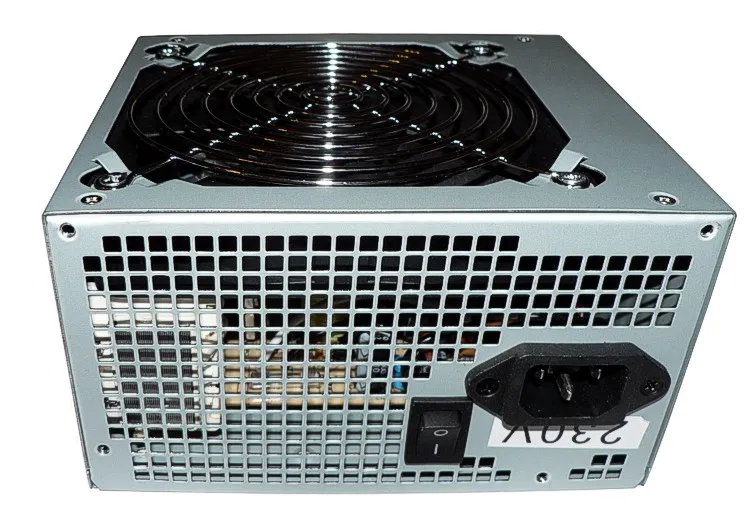
Photo by Baran Ivo / Wikimedia Commons / Public domain
The power supply is one of the least glamorous parts of a build and one of the easiest to underspend on — it doesn’t show up in frame-rate discussions, so it’s tempting to treat it as a place to save money. That’s a mistake: getting wattage wrong causes real stability problems, and it’s the one component that, if it fails, can potentially damage everything else connected to it.
Add up your components’ actual power draw
The most reliable starting point is estimating the power draw of your specific components — GPU and CPU dominate this calculation, with everything else (motherboard, RAM, drives, fans) adding a comparatively small amount on top. Manufacturers publish rated power figures for GPUs and CPUs specifically for this purpose. Many PSU manufacturers and retailers also offer online wattage calculator tools where you input your specific components and get a recommended wattage — these are a fast, reasonably reliable way to sanity-check a manual estimate.
Why headroom matters, not just meeting the minimum
Once you have an estimated total draw, don’t buy a PSU rated at exactly that number. A few reasons headroom matters:
- Transient power spikes. Modern GPUs in particular can draw brief power spikes well above their rated sustained draw, especially under variable gaming loads. A PSU with too little headroom can struggle with these spikes even if its rated wattage looks adequate on paper for average draw.
- Efficiency curves. PSUs run most efficiently in a middle band of their rated capacity, typically somewhere around 40–70% load, rather than right at their maximum. A PSU running constantly near its rated limit runs hotter, is less efficient, and has less room to handle spikes gracefully.
- Future upgrades. A GPU upgrade down the line, or adding more drives and fans, all add draw. A PSU with some headroom built in avoids forcing a PSU replacement alongside your next upgrade.
A commonly used rule of thumb is sizing your PSU to roughly 1.5 to 2 times your estimated typical system draw, though the right amount of headroom depends on how much spike behavior your specific GPU exhibits and how likely you are to upgrade components later.
Don’t just chase a bigger number, either
Buying far more wattage than any realistic version of your system will use is a real but smaller mistake than undersizing — it wastes money on a bigger unit than necessary and, because of the efficiency curve mentioned above, can even run slightly less efficiently at very low relative load than a more appropriately sized unit would. Reasonable headroom is valuable; buying two or three times your realistic draw generally isn’t.
Quality and certification matter as much as raw wattage
A wattage number alone doesn’t tell you how well a PSU delivers that power — voltage stability, build quality, and protection circuitry vary significantly between units of the same rated wattage. Look for units with a recognized efficiency certification (see our companion article on 80 Plus certification) and a meaningful manufacturer warranty, since warranty length is often a reasonable proxy for how much confidence a manufacturer has in their own unit’s components and longevity.
Putting it together
Estimate your components’ actual draw using manufacturer specs or a calculator tool, build in reasonable headroom above that for spikes and future upgrades, and choose a unit with solid efficiency certification and warranty backing rather than picking purely on wattage or price. The PSU is not where a gaming build benefits from cutting corners — everything else in the system depends on it working correctly.
Our picks: Power supplies
Shop on Amazon
Affiliate links.As an Amazon Associate I earn from qualifying purchases. Links below go to Amazon; prices and availability change, so check Amazon for current pricing.Affiliate disclosure
Illustrative photos: Photo by Victor Korniyenko / Wikimedia Commons / CC BY-SA 3.0; Photo by Baran Ivo / Wikimedia Commons / Public domain