Motherboard Form Factors Explained: ATX, Micro-ATX, and Mini-ITX
The physical size of a motherboard determines your case options, expansion room, and how much of a build you can realistically upgrade later.
The physical size of a motherboard determines your case options, expansion room, and how much of a build you can realistically upgrade later.
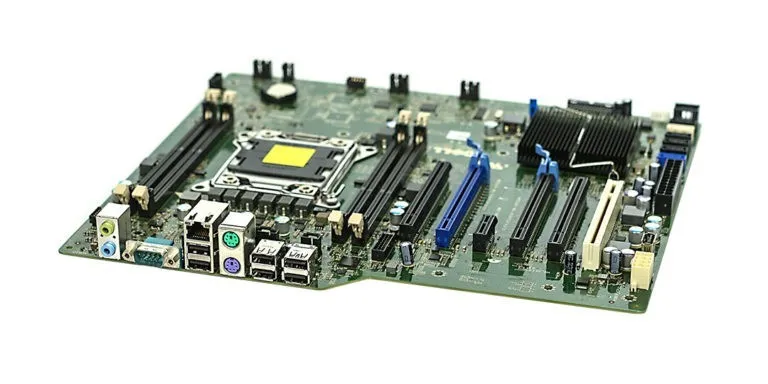
Photo by Marcin Wieclaw (pcsite.co.uk) / Wikimedia Commons / CC BY-SA 4.0
Motherboard form factor is a standardized physical size and mounting-hole layout, and it’s one of the first decisions in any build because it determines which cases you can use and how much room you have for expansion cards, RAM slots, and drives. Getting this choice right up front avoids compatibility headaches later.
ATX: the standard, full-featured choice
ATX is the most common full-size form factor and the default choice for most desktop gaming builds. It typically offers the most expansion slots, the most RAM slots (commonly four), and the most room for multiple M.2 storage slots and other headers. ATX cases are also the most widely available and tend to have the best airflow and cable management room, since the case itself has more interior volume to work with. If you’re not constrained by space and want maximum flexibility — for RAM capacity, future expansion cards, or extra storage — ATX is the safest default.
Micro-ATX: a smaller footprint with modest tradeoffs
Micro-ATX is physically smaller than ATX, generally with fewer expansion slots and sometimes fewer RAM slots, though this varies by specific board. For a build that’s primarily GPU- and CPU-focused with modest expansion needs, Micro-ATX gives up relatively little in practice while allowing a somewhat smaller case. It’s a reasonable middle ground for builders who want to save some desk space without moving to the more significant compromises of Mini-ITX.
Mini-ITX: maximum space savings, real compromises
Mini-ITX is the smallest common form factor, built around a single expansion slot (almost always used by the graphics card) and typically two RAM slots instead of four. Building in Mini-ITX usually means a noticeably smaller case, which is appealing for a compact living-room or desk-constrained build, but it comes with real tradeoffs: less room for cooling, tighter cable management, fewer storage options, and less headroom for future upgrades. Mini-ITX builds also tend to cost a bit more for equivalent specs, since compact, specialized components carry a premium over their full-size equivalents. This form factor makes the most sense when you have a specific, strong reason to prioritize size — it’s a harder choice to justify if space isn’t actually a constraint for you.
How to actually decide
Work backward from how much space you have and how much future expansion you realistically want:
- Want maximum upgrade room and the most straightforward build experience? ATX.
- Want a somewhat smaller footprint without major sacrifices? Micro-ATX.
- Have a genuine space constraint and are willing to accept a more demanding build process and fewer expansion options in exchange? Mini-ITX.
Compatibility checks that matter beyond size
Once you’ve picked a form factor, confirm the case you’re considering explicitly supports it — cases are generally designed around one or more specific form factors, and while larger cases often support smaller boards, the reverse is never true. Also check GPU length clearance and CPU cooler height clearance for your specific case and form factor combination, since smaller cases are more likely to have tight tolerances here, and double-check that the motherboard’s CPU socket matches the CPU you’re planning to use — form factor and socket type are independent specifications, and neither one implies the other.
Our picks: Motherboards
Shop on Amazon
Affiliate links.As an Amazon Associate I earn from qualifying purchases. Links below go to Amazon; prices and availability change, so check Amazon for current pricing.Affiliate disclosure
Illustrative photos: Photo by Marcin Wieclaw (pcsite.co.uk) / Wikimedia Commons / CC BY-SA 4.0; Photo by PantheraLeo1359531 / Wikimedia Commons / CC BY 4.0