Essential PC Building Accessories You Shouldn't Skip
A handful of inexpensive tools and supplies make the difference between a smooth build and a frustrating one. Here is what actually earns a spot in your kit.
A handful of inexpensive tools and supplies make the difference between a smooth build and a frustrating one. Here is what actually earns a spot in your kit.
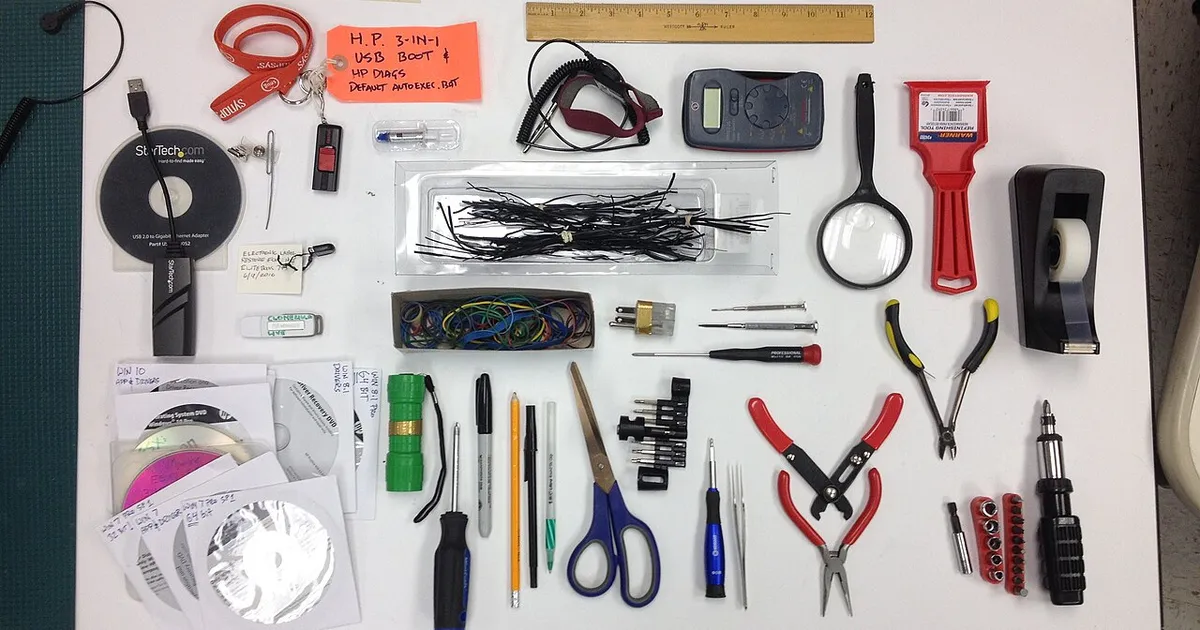
Photo by Bill Abbott / Wikimedia Commons / CC BY-SA 2.0
Most of the money in a PC build goes toward the big-ticket components, but a small set of inexpensive accessories makes the actual build process meaningfully smoother — and skipping them is one of the most common sources of avoidable frustration for first-time builders.
A proper screwdriver kit
The screws inside a PC case are small, and a single all-purpose screwdriver from a household drawer often isn’t the right size or type for all of them, especially motherboard standoffs and some case-specific fasteners. A small magnetic-tip screwdriver kit with a few Phillips head sizes makes assembly noticeably easier and reduces the risk of stripping a screw head, which can turn a five-minute step into a frustrating one. Magnetic tips also help enormously when working inside a case’s tighter, harder-to-reach spots, where a dropped screw can be genuinely difficult to retrieve.
Anti-static protection
Static discharge from your own body can, in rare cases, damage sensitive components like the CPU, motherboard, or RAM during handling. An anti-static wrist strap that clips to a grounded point is a simple, cheap way to eliminate this risk entirely rather than relying on habits like periodically touching an unpainted metal surface, which helps but is easy to forget to do consistently throughout a build.
Thermal paste (even with a pre-applied cooler)
Most CPU coolers ship with thermal paste pre-applied, which is fine for the initial build. But if you ever remove the cooler — for a different motherboard, a case swap, or general maintenance — you’ll need fresh paste to reapply, since removing a cooler disturbs the original even spread and reusing it isn’t a reliable option. Keeping a small tube on hand means you’re never stuck mid-project waiting on a delivery.
Zip ties and reusable cable straps
Basic zip ties are cheap and effective for a first pass at cable management, bundling cables together and routing them away from fans and the main airflow path. Reusable hook-and-loop (velcro-style) straps cost a little more but can be undone and reused as you refine your cable routing or make changes later, which makes them worth the small extra cost for anyone who expects to open the case again for upgrades or troubleshooting.
Extra screws and standoffs
It happens to nearly every builder eventually: a dropped screw that rolls somewhere unreachable, or a case that ships one motherboard standoff short. Keeping a small assortment of spare case screws and motherboard standoffs on hand — often available cheaply in multi-packs — turns what could be a project-halting problem into a non-issue.
A parts tray or small containers
PC builds involve a surprising number of small loose screws and brackets across multiple steps, and it’s easy to lose track of which screws go where, especially if you’re interrupted mid-build. A simple parts tray, or even a few small bowls or containers, keeps hardware organized and sorted by step, which matters more than it sounds like it would once you’re an hour into a build.
Building a kit that pays for itself
None of these items are individually expensive, and most are reusable across every future build or upgrade you ever do — this is a one-time investment, not a per-build cost. Compared to the cost of the components going into a build, a basic accessory kit is a small fraction of the total spend, and it directly reduces the risk of a frustrating, avoidable problem derailing an otherwise straightforward build.
Our picks: PC building essentials & Case fans
Shop on Amazon
Affiliate links.As an Amazon Associate I earn from qualifying purchases. Links below go to Amazon; prices and availability change, so check Amazon for current pricing.Affiliate disclosure

Illustrative photos: Photo by Bill Abbott / Wikimedia Commons / CC BY-SA 2.0; Photo by Mkhan4793 / Wikimedia Commons / CC BY-SA 3.0; Photo by 18bit / Wikimedia Commons / CC BY-SA 4.0