Nintendo Switch Buying Guide: Which Model Fits Your Play Style
How to choose between Nintendo Switch models based on how and where you actually play, not just the spec sheet.
How to choose between Nintendo Switch models based on how and where you actually play, not just the spec sheet.
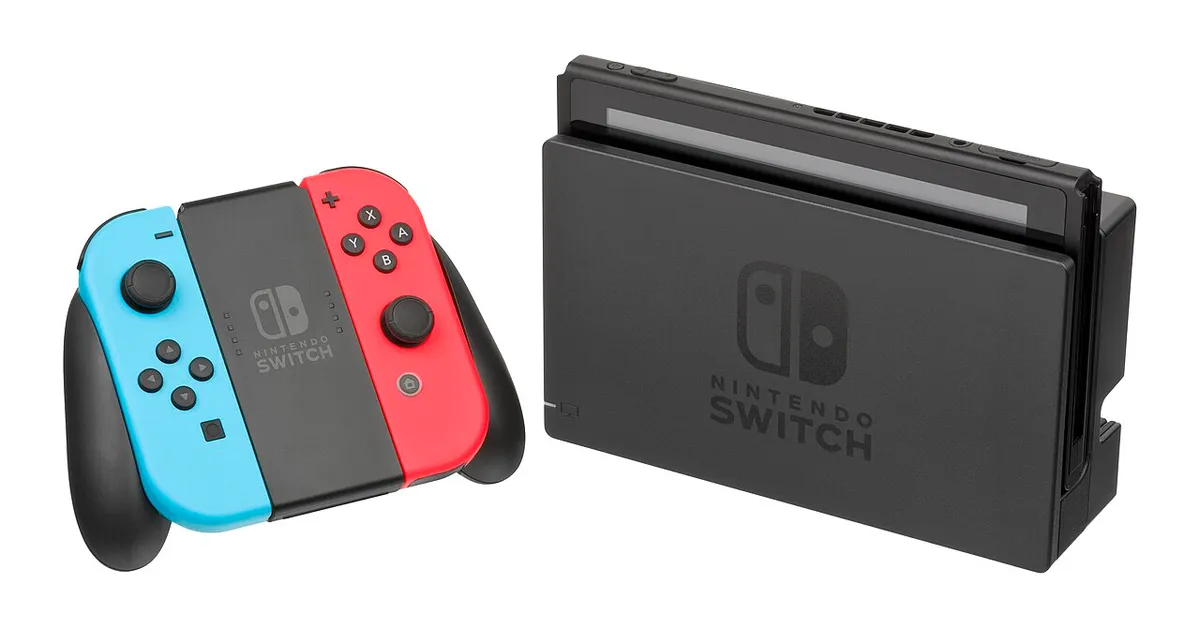
Photo by Evan-Amos / Wikimedia Commons / Public domain
Nintendo’s Switch lineup has grown to include multiple models built around different priorities, and the “best” one genuinely depends on how you plan to play rather than which is objectively the most powerful.
Handheld, Tabletop, and Docked Modes Explained
The core idea behind Switch is a single console that moves between three modes: handheld (playing directly on the built-in screen), tabletop (propping the screen up with a kickstand for local multiplayer without a TV), and docked (connecting to a TV through a dock for the biggest screen and, in docked mode, generally the best output quality). Not every model supports all three modes in the same way, so think honestly about which mode you’ll actually use most before comparing specs.
Comparing the Switch Lineup
Nintendo has offered several Switch variants over time, generally differentiated by screen quality, portability, and whether they support docking to a TV at all. Some models prioritize a larger, sharper handheld screen for players who mostly play undocked; others are built as a smaller, lighter, more affordable option aimed at handheld-only play and often skip TV output entirely. Because model availability and exact features change over time, check current official specifications for whichever models are actually on sale before comparing them directly — but the general framework of “which modes do I actually need” holds regardless of which specific models you’re choosing between.
Storage and Game Cards vs. Digital
Built-in storage on Switch consoles tends to run smaller than on home consoles, and it fills up quickly once you start downloading digital games, especially larger titles. A microSD card is the standard way to expand storage, and it’s worth buying one at the same time as the console rather than waiting until you hit a storage wall mid-download. If you prefer buying physical game cards over digital downloads, storage pressure matters less, though many first-party and third-party titles are increasingly digital-only or ship as a card that still requires a large download.
Choosing Based on How You’ll Actually Play
- Mostly playing on the go, on trains, or away from a TV: prioritize battery life and screen quality over docked output, since you’ll rarely use the dock anyway.
- Mostly playing at home on a TV with occasional handheld sessions: a model with reliable docked output matters more than handheld screen specs.
- Buying primarily for a child or as a lighter secondary device: a smaller, more affordable, handheld-focused model often makes more sense than paying for features you won’t use.
- Local multiplayer with friends or family: tabletop mode and having enough Joy-Con or extra controllers on hand matters as much as which console model you pick.
A Note on Buying Used or Older Models
Because Switch models have been on the market for years, used and older-stock consoles are common and can be a reasonable way to save money, particularly for handheld-focused buyers who don’t need the newest screen technology. Always check the seller’s return policy and test Joy-Con response and the screen for dead pixels or dock connector wear before finalizing a used purchase.
Bottom Line
Don’t default to the newest or most expensive Switch model without first being honest about how much you’ll actually use TV docking versus handheld play. The right model is the one that matches your actual habits — an expensive model bought for docked play you rarely use is a worse buy than a cheaper, handheld-focused one you’ll use every day.
Our picks: Nintendo
Shop on Amazon
Affiliate links.As an Amazon Associate I earn from qualifying purchases. Links below go to Amazon; prices and availability change, so check Amazon for current pricing.Affiliate disclosure
SanDisk microSD Express card for Nintendo Switch 2
Switch 2 needs microSD Express cards for extra storage.
Check price on Amazon
Illustrative photos: Photo by Evan-Amos / Wikimedia Commons / Public domain; Photo by Owen1962 / Wikimedia Commons / Public domain