Getting the Most Out of Your DualSense Controller: Tips, Care, and Common Fixes
Practical advice for PlayStation DualSense owners — battery habits, cleaning, and how to handle stick drift before it gets worse.
Practical advice for PlayStation DualSense owners — battery habits, cleaning, and how to handle stick drift before it gets worse.
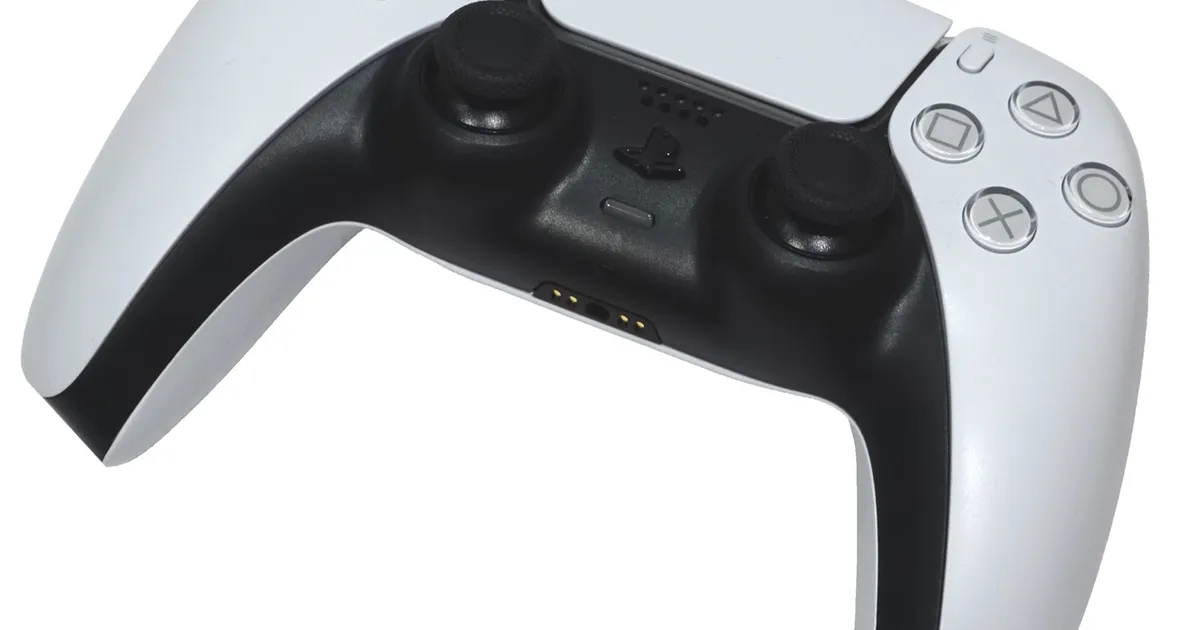
Photo by Alex Cochrane / Wikimedia Commons / CC BY-SA 4.0
The DualSense controller does more than any previous PlayStation pad — adaptive triggers, haptic feedback, and a built-in microphone all add functionality, but they also mean there’s more that can go wrong if the controller isn’t looked after. A little routine care goes a long way.
What Makes DualSense Different
Unlike older controllers built mainly around simple rumble motors, DualSense uses haptic feedback for more textured, localized vibration, and adaptive triggers that can add resistance to L2/R2 depending on the game. These features draw more power than a standard controller, which is part of why DualSense battery life tends to feel shorter than older PlayStation pads, especially in games that lean heavily on trigger resistance and haptics.
Battery Life and Charging Habits
A few habits meaningfully extend how long you get between charges and how long the internal battery stays healthy over time:
- Charge via a proper USB-C cable rather than leaving the controller connected to a low-power port for extended trickle charging.
- Avoid routinely running the battery all the way to zero — like most modern lithium batteries, occasional partial charges are gentler long-term than repeated full discharges.
- Turn off the controller (rather than just leaving your console asleep) when you’re done for an extended period, since some idle states still draw a small amount of power.
- Lower haptic and trigger intensity in games that offer the option if you’re prioritizing battery life over the tactile effect.
Preventing and Fixing Stick Drift
Stick drift — where a control stick registers movement even when you’re not touching it — usually starts as dust or debris interfering with the internal sensor, though it can also result from normal wear on the potentiometer over long-term use. Before assuming the worst, try recalibrating the controller through your console’s accessibility or device settings, and try gently cleaning around the base of the stick with a can of compressed air. Avoid liquid cleaners near the stick housing.
If drift persists after cleaning and recalibration, it’s a hardware wear issue rather than something software can fix. Depending on how you use the controller, some owners choose repair services or replacement parts, while others treat it as a sign the controller has reached the end of its useful life. Either way, catching drift early and addressing it prevents the frustration of it worsening mid-session in a competitive or precision-heavy game.
Cleaning and Storage Tips
Skin oils, dust, and food residue build up faster on a controller than most people expect, especially around the sticks and buttons. A soft, slightly damp microfiber cloth handles most surface grime — avoid spraying cleaner directly onto the controller, and never submerge it. For the crevices around buttons and triggers, a soft brush or compressed air removes debris without risking moisture damage.
When storing a controller for an extended period without use, keep it somewhere temperature-stable rather than a hot car or direct sunlight, and store it with a partial rather than empty battery charge if possible.
Wrapping Up
Most DualSense problems are preventable with basic care: charge sensibly, clean regularly, and address early signs of drift before they become a bigger issue. The controller’s extra features are worth the tradeoff in battery life and complexity, but they do reward a bit more maintenance than a bare-bones gamepad.
Our picks: PlayStation
Shop on Amazon
Affiliate links.As an Amazon Associate I earn from qualifying purchases. Links below go to Amazon; prices and availability change, so check Amazon for current pricing.Affiliate disclosure
Illustrative photos: Photo by Osh33m / Wikimedia Commons / CC BY-SA 4.0; Photo by Alex Cochrane / Wikimedia Commons / CC BY-SA 4.0